> For the complete documentation index, see [llms.txt](https://docs.saleschat.pro/llms.txt). Markdown versions of documentation pages are available by appending `.md` to page URLs; this page is available as [Markdown](https://docs.saleschat.pro/application/analytics/example-reports.md).

# Example Reports

The questions marketing, sales and product teams actually ask — and exactly how to build each one, from a first chart to multi-event funnels.

Every recipe below follows the same shape: **the question**, **how to build it**, and **how to read it** — because the second half is where reports go wrong.

If a name in these steps doesn't mean anything to you, look it up in the [Events Reference](/application/analytics/events-reference.md).

{% hint style="info" %}
**Before you start**

Open **Analytics → Trends**. On the right you'll find three sections — **Series**, [**Filters**](/application/analytics.md#filters) and [**Breakdown**](/application/analytics.md#breakdown) — and above the chart, the [date range](/application/analytics.md#date-range). That's the whole interface, and [the controls every report shares](/application/analytics.md#the-controls-every-report-shares) covers all four.
{% endhint %}

## Jump to a recipe

**Trends recipes**

* **1.** [How many new leads are we getting, and where from?](#recipe-1-how-many-new-leads-are-we-getting-and-where-from)
* **2.** [Who is actually doing the talking?](#recipe-2-who-is-actually-doing-the-talking)
* **3.** [Are leads tapping our buttons, or typing at us?](#recipe-3-are-leads-tapping-our-buttons-or-typing-at-us)
* **4.** [Is WhatsApp actually delivering our messages?](#recipe-4-is-whatsapp-actually-delivering-our-messages)
* **5.** [Which template earns its place?](#recipe-5-which-template-earns-its-place)
* **6.** [How many of our messages never went out?](#recipe-6-how-many-of-our-messages-never-went-out)
* **7.** [Is this automation reliable?](#recipe-7-is-this-automation-reliable)
* **8.** [How many leads did this campaign actually reach?](#recipe-8-how-many-leads-did-this-campaign-actually-reach)
* **9.** [How long are our conversations?](#recipe-9-how-long-are-our-conversations)
* **10.** [How much of our inbound has to wait for a human?](#recipe-10-how-much-of-our-inbound-has-to-wait-for-a-human)
* **11.** [New leads vs returning conversations](#recipe-11-new-leads-vs-returning-conversations)
* **12.** [When did each customer first do the thing that matters?](#recipe-12-when-did-each-customer-first-do-the-thing-that-matters)

**Funnel recipes**

* **13.** [Did anyone reply to our campaign?](#recipe-13-did-anyone-reply-to-our-campaign)
* **14.** [From new lead to a real conversation](#recipe-14-from-new-lead-to-a-real-conversation)
* **15.** [Which campaign converts best?](#recipe-15-which-campaign-converts-best)
* **16.** [Who exactly dropped off, and can I have the list?](#recipe-16-who-exactly-dropped-off-and-can-i-have-the-list)

**Advanced recipes — Trends**

* **17.** [Count several different events as one thing](#recipe-17-count-several-different-events-as-one-thing)
* **18.** [Split by two things at once](#recipe-18-split-by-two-things-at-once)
* **19.** [A ratio you work out yourself](#recipe-19-a-ratio-you-work-out-yourself)
* **20.** [How bad does it get, not how bad is it on average](#recipe-20-how-bad-does-it-get-not-how-bad-is-it-on-average)
* **21.** [Which campaign first reached each lead, month by month](#recipe-21-which-campaign-first-reached-each-lead-month-by-month)

**Advanced recipes — Funnels**

* **22.** [Remove the leads who disqualified themselves](#recipe-22-remove-the-leads-who-disqualified-themselves)
* **23.** [Does the order actually matter?](#recipe-23-does-the-order-actually-matter)
* **24.** [Which step is actually the problem?](#recipe-24-which-step-is-actually-the-problem)
* **25.** [Who gets the credit?](#recipe-25-who-gets-the-credit)
* **26.** [The full campaign-to-pipeline funnel](#recipe-26-the-full-campaign-to-pipeline-funnel)

***

<figure><img src="https://3972437347-files.gitbook.io/~/files/v0/b/gitbook-x-prod.appspot.com/o/spaces%2FN79Qkvilzy4rLCQtSeUa%2Fuploads%2Fgit-blob-a078a657d74897a5f6a1c0f108dd49dae2eff9b2%2Fanalytics-trends-builder.png?alt=media" alt=""><figcaption><p>The Trends builder</p></figcaption></figure>

## Trends recipes

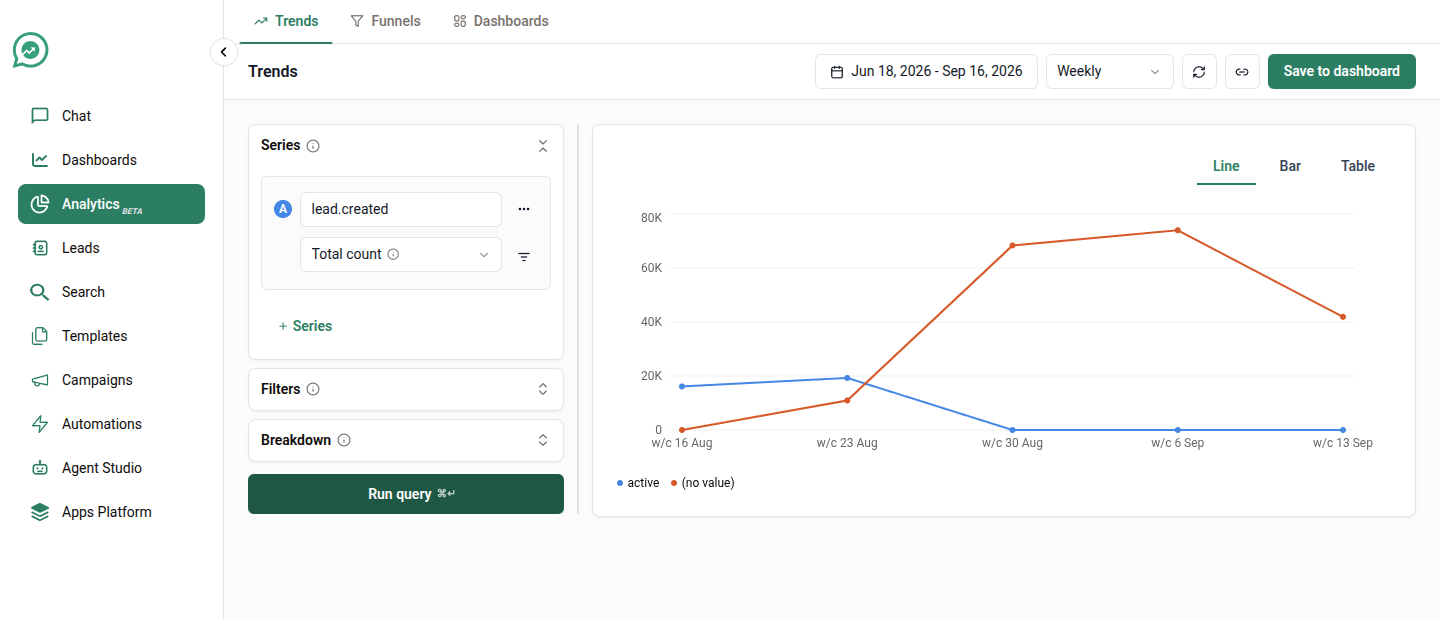
### Recipe 1: How many new leads are we getting, and where from?

**Build it**

1. Series → event **`lead.created`**, measurement **Total count**.
2. Breakdown → pick the attribute that holds your source — one of your own, like `lead.source` or `lead.channel`, or `lead.sc_campaign` if you set campaign labels.
3. Date range → **Last 90 days**, grouped by **Week**.

<figure><img src="https://3972437347-files.gitbook.io/~/files/v0/b/gitbook-x-prod.appspot.com/o/spaces%2FN79Qkvilzy4rLCQtSeUa%2Fuploads%2Fgit-blob-4c72c6069479e3e16147918d9c3c20315411022e%2Fanalytics-recipe-01-new-leads.png?alt=media" alt=""><figcaption><p>New leads per week, split by status</p></figcaption></figure>

**Read it**

One line per source. A source that only appears halfway through the chart is new, not broken — a gap means nothing happened, not zero.

If you have more than 25 sources, the smallest are rolled into a single [**Other**](/application/analytics.md#breakdown) line. That ranking is over the whole 90 days, so a source that spiked once in week 2 can still end up in **Other**.

***

### Recipe 2: Who is actually doing the talking?

The single most clarifying chart in the product, and it takes thirty seconds.

**Build it**

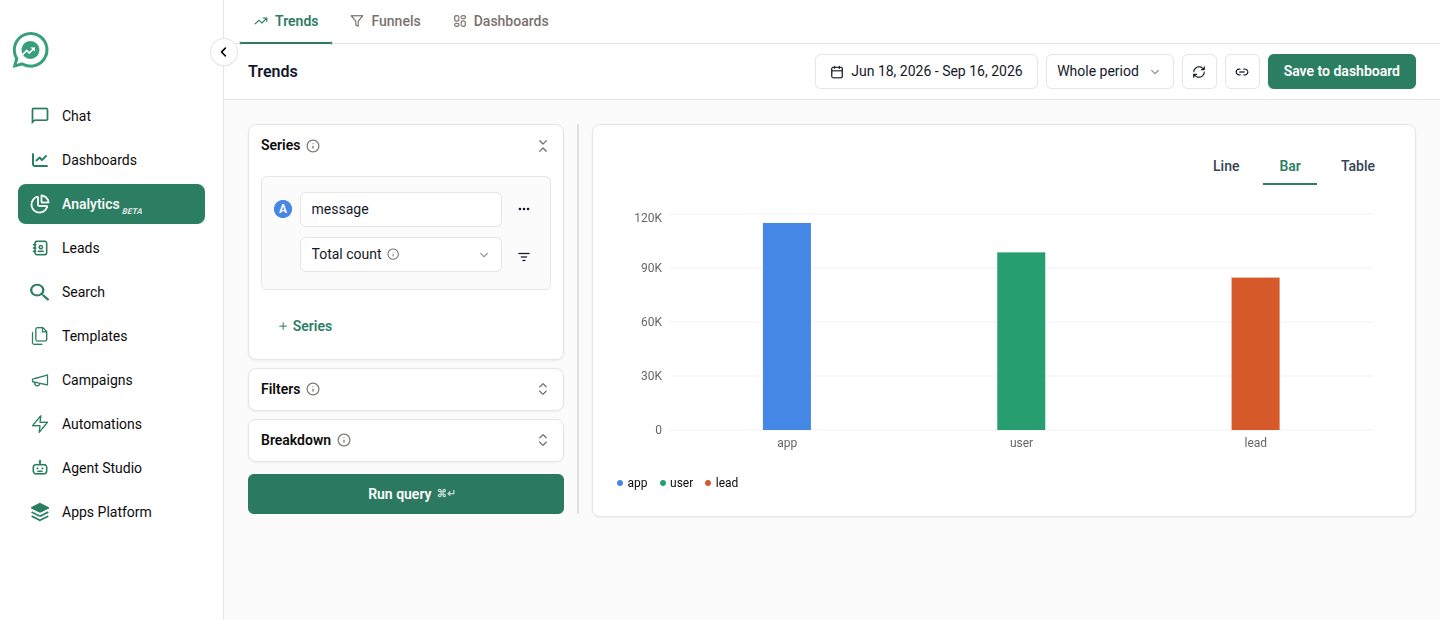
1. Series → event **`message`**, measurement **Total count**.
2. Breakdown → **`participant.sc_type`**.
3. Switch the chart to **Bar**, and set **Group by** to **Whole period**.

<figure><img src="https://3972437347-files.gitbook.io/~/files/v0/b/gitbook-x-prod.appspot.com/o/spaces%2FN79Qkvilzy4rLCQtSeUa%2Fuploads%2Fgit-blob-a078a657d74897a5f6a1c0f108dd49dae2eff9b2%2Fanalytics-trends-builder.png?alt=media" alt=""><figcaption><p>Lead, automation and agent message volume side by side</p></figcaption></figure>

**Read it**

Three bars: **lead** (your customers), **user** (your human agents), **app** (campaigns, automations and bots).

If `app` dwarfs the other two, you are broadcasting rather than conversing. If `lead` is a sliver, your outbound isn't landing. This ratio is the fastest health check you have.

***

### Recipe 3: Are leads tapping our buttons, or typing at us?

**Build it**

1. Series → event **`message`**, measurement **Total count**.
2. On that series' row, use the **filter icon** → `participant.sc_type` **is** `lead`.
3. Breakdown → **`message.sc_reply_kind`**.

<figure><img src="https://3972437347-files.gitbook.io/~/files/v0/b/gitbook-x-prod.appspot.com/o/spaces%2FN79Qkvilzy4rLCQtSeUa%2Fuploads%2Fgit-blob-0b30cfcb633da6d3afad6a240a83ff1d32bfa573%2Fanalytics-recipe-03-reply-kind.png?alt=media" alt=""><figcaption><p>Interactive taps against typed replies</p></figcaption></figure>

**Read it**

`interactive` means the lead tapped a button or list option you offered. `free_flow` means they typed their own message.

A high `free_flow` share on a template-heavy flow usually means your buttons aren't offering what people actually want to say — and every free-flow reply is one an agent has to read.

Replies we can't classify are left out of both bars, so the two won't always add up to your total lead messages.

***

### Recipe 4: Is WhatsApp actually delivering our messages?

**Build it**

1. Series 1 → **`message.receipt.sent`**, Total count. Label it *Sent*.
2. Add a series → **`message.receipt.delivered`**. Label it *Delivered*.
3. Add a third → **`message.receipt.read`**. Label it *Read*.
4. Group by **Day**, chart view **Line**.

**Read it**

Three lines that should sit in a stable ratio. A delivered line that suddenly diverges from sent points at a number-quality or WhatsApp-side problem, not at your content. A read line that collapses while delivered holds steady is a content problem.

***

### Recipe 5: Which template earns its place?

**Build it**

1. Series 1 → **`message.receipt.sent`**, Total count, labelled *Sent*.
2. Series 2 → **`message.receipt.read`**, Total count, labelled *Read*.
3. Breakdown → **`template.sc_name`**.
4. **Group by** → **Whole period**, chart view **Table**.

**Read it**

The table gives you sent and read side by side per template — read rate is one division away. Use **Table** rather than a chart here; ranking twenty templates is a reading task, not a picture.

To compare categories instead of individual templates, break down by `template.sc_waba_template_category` and you'll see how your marketing templates fare against your utility ones.

***

### Recipe 6: How many of our messages never went out?

**Build it**

1. Series → event **`message`**, measurement **Total count**.
2. Filters → `message.sc_success` **is** `false`.
3. Breakdown → **`journey.sc_name`**.

**Read it**

These are messages blocked **before** WhatsApp ever saw them — outside working hours, stopped by moderation, containing a filtered word, or sent to a conversation whose window had closed.

Breaking down by journey name tells you which campaign or automation is generating the waste. A single automation dominating this chart usually means its schedule and your working hours disagree.

***

### Recipe 7: Is this automation reliable?

**Build it**

1. Series → event **`journey.execution`**, measurement **Total count**.
2. Filters → `journey.sc_name` **is** your automation's name.
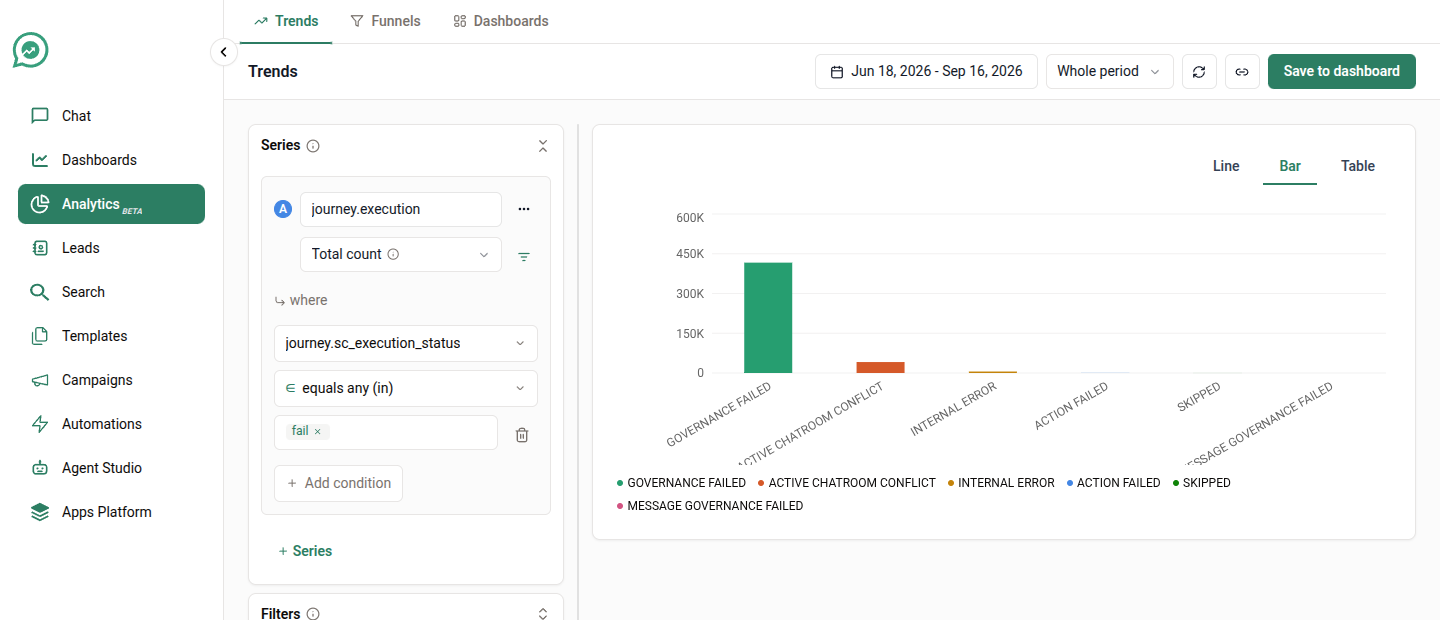
3. Breakdown → **`journey.sc_execution_status`**.

Then, to see *why* things fail, change the breakdown to **`journey.sc_execution_failure_type`** and add a filter `journey.sc_execution_status` **is** `fail`.

<figure><img src="https://3972437347-files.gitbook.io/~/files/v0/b/gitbook-x-prod.appspot.com/o/spaces%2FN79Qkvilzy4rLCQtSeUa%2Fuploads%2Fgit-blob-e5aec526c4921d498ccde2d3edfcec8e57318013%2Fanalytics-recipe-07b-failure-reasons.png?alt=media" alt=""><figcaption><p>Failures by reason — governance limits are the system working, not a fault</p></figcaption></figure>

<figure><img src="https://3972437347-files.gitbook.io/~/files/v0/b/gitbook-x-prod.appspot.com/o/spaces%2FN79Qkvilzy4rLCQtSeUa%2Fuploads%2Fgit-blob-2de7ce001e427feac6d4eea8e4a20b9f2a858e24%2Fanalytics-recipe-07-automation-status.png?alt=media" alt=""><figcaption><p>Automation runs by outcome</p></figcaption></figure>

**Read it**

`journey.execution` counts **attempts, not leads**. An automation that fires three times for one lead contributes three.

Failures are not all equal: send-limit and governance rejections mean the automation deliberately held back, which is the system working. Genuine errors are the ones worth chasing.

***

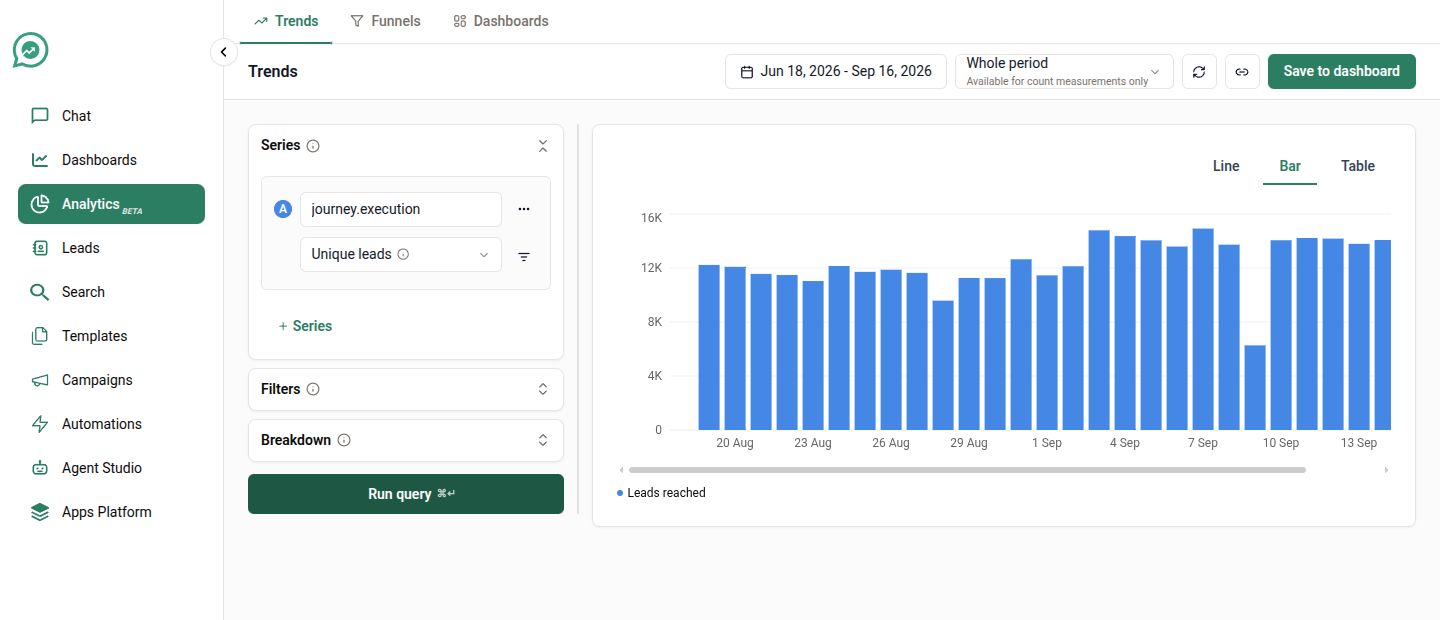
### Recipe 8: How many leads did this campaign actually reach?

**Build it**

1. Series → event **`journey.execution`**, measurement **Unique leads**.
2. Filters → `journey.sc_name` **is** your campaign's name.
3. Group by **Whole period**.

<figure><img src="https://3972437347-files.gitbook.io/~/files/v0/b/gitbook-x-prod.appspot.com/o/spaces%2FN79Qkvilzy4rLCQtSeUa%2Fuploads%2Fgit-blob-115e2b10c31aa53f42493f1d52ef91bb647aaa18%2Fanalytics-recipe-08-unique-reached.png?alt=media" alt=""><figcaption><p>Unique leads reached, counted once each</p></figcaption></figure>

**Read it**

**Unique leads** is doing the work here. Where **Total count** would give you attempts — including retries and repeat sends — **Unique leads** counts each person once, which is the number you'd quote to a stakeholder.

Run the same query both ways and the gap between them is your retry and repeat volume.

***

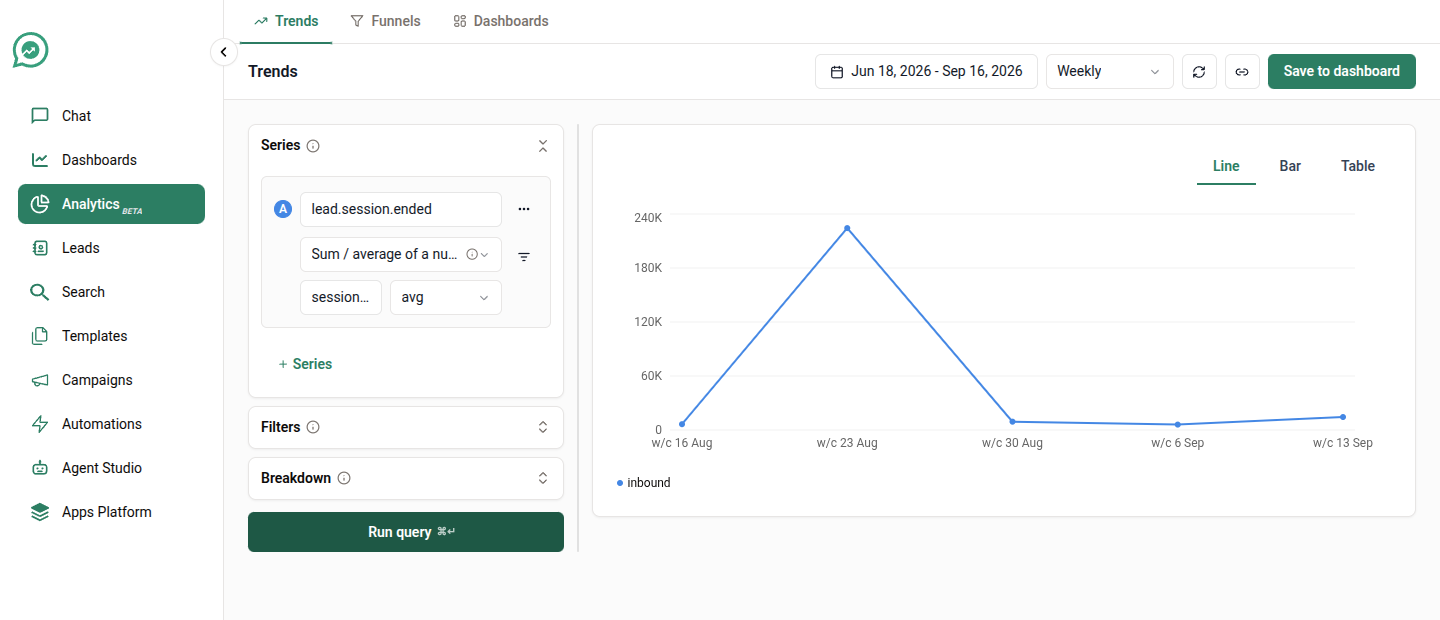
### Recipe 9: How long are our conversations?

**Build it**

1. Series → event **`lead.session.ended`**.
2. Measurement → **Sum / average of a number**, operation **avg**, attribute **`session.sc_duration_secs`**.
3. Group by **Week**.

<figure><img src="https://3972437347-files.gitbook.io/~/files/v0/b/gitbook-x-prod.appspot.com/o/spaces%2FN79Qkvilzy4rLCQtSeUa%2Fuploads%2Fgit-blob-60dc920b96e2aae5d70d4563300d837326987983%2Fanalytics-recipe-09-session-duration.png?alt=media" alt=""><figcaption><p>Average conversation length per week</p></figcaption></figure>

**Read it**

The number is in seconds. Averages hide their tails — a handful of conversations someone forgot to close will drag the whole line up — so switch the operation to **median** for the typical case, and to **p90** for "how bad does it get".

Conversations without a recorded duration are skipped entirely rather than counted as zero.

***

### Recipe 10: How much of our inbound has to wait for a human?

**Build it**

1. Series 1 → **`lead.session.started`**, Total count, labelled *Started*.
2. Series 2 → **`lead.session.queued`**, Total count, labelled *Queued for an agent*.
3. Group by **Day**.

**Read it**

The gap between the two lines is everything your automations handled without a person. The queued line rising while started stays flat means your deflection is slipping.

***

### Recipe 11: New leads vs returning conversations

**Build it**

1. Series → event **`message`**, measurement **Unique leads**.
2. On the series row, filter → `participant.sc_type` **is** `lead`.
3. Breakdown → **`lead.sc_is_new`**.

<figure><img src="https://3972437347-files.gitbook.io/~/files/v0/b/gitbook-x-prod.appspot.com/o/spaces%2FN79Qkvilzy4rLCQtSeUa%2Fuploads%2Fgit-blob-1e7111c39ef60d020c5395b5ba1bac121c024e66%2Fanalytics-recipe-11-new-vs-returning.png?alt=media" alt=""><figcaption><p>New leads against returning conversations</p></figcaption></figure>

**Read it**

`true` means the lead was created within 24 hours of that message — a genuinely new conversation. `false` is someone coming back.

This is the chart that tells you whether growth is acquisition or re-engagement.

***

### Recipe 12: When did each customer first do the thing that matters?

This one needs an event of your own — `demo_booked`, `payment_received`, `policy_issued`. See [Getting your own data in](/application/analytics.md#getting-your-own-data-in).

**Build it**

1. Series → your event, e.g. **`payment_received`**.
2. Measurement → **First-ever occurrence**.
3. Group by **Month**.

**Read it**

Each lead is counted **once**, on the date of their very first such event ever — so this is genuinely new customers per month, not repeat business.

{% hint style="warning" %}
**First-ever occurrence** searches across all time, then only shows leads whose first-ever event falls inside your date range. A customer whose first payment was before your window won't appear at all, even if they paid again inside it. That's the point of the measurement, but it surprises people.

If you want "first time they did this *matching my filters*", use **First occurrence matching filters** instead.
{% endhint %}

***

## Funnel recipes

Funnels answer a different shape of question: not *how much*, but *how many made it through*.

Open **Analytics → Funnels**. A funnel takes **2 to 5 steps**, in the order a lead should do them.

<figure><img src="https://3972437347-files.gitbook.io/~/files/v0/b/gitbook-x-prod.appspot.com/o/spaces%2FN79Qkvilzy4rLCQtSeUa%2Fuploads%2Fgit-blob-8d598a4a8253f0b0c1a811c2fb386b341eb12f63%2Fanalytics-funnels-builder.png?alt=media" alt=""><figcaption><p>A funnel with its steps and settings</p></figcaption></figure>

### Recipe 13: Did anyone reply to our campaign?

**Build it**

1. Step 1 → **`message`**, filtered `participant.sc_type` **is** `app` **and** `journey.sc_name` **is** your campaign.
2. Step 2 → **`message`**, filtered `participant.sc_type` **is** `lead`.
3. Settings → **Conversion window** `3 days`.

<figure><img src="https://3972437347-files.gitbook.io/~/files/v0/b/gitbook-x-prod.appspot.com/o/spaces%2FN79Qkvilzy4rLCQtSeUa%2Fuploads%2Fgit-blob-3cf9e7c067113f229e8bbd8cdd02be0ee341fe06%2Fanalytics-recipe-13-campaign-reply.png?alt=media" alt=""><figcaption><p>Reached, then replied</p></figcaption></figure>

**Read it**

Step 2 is your reply rate, and the drop-off between the two bars is everyone who ignored you.

{% hint style="info" %}
A lead's reply carries no campaign tag — it's just a message. So step 2 is matched **by time**: any reply from that lead within the conversion window counts. Keep the window tight (a day or three) or you'll credit the campaign with replies it had nothing to do with.
{% endhint %}

***

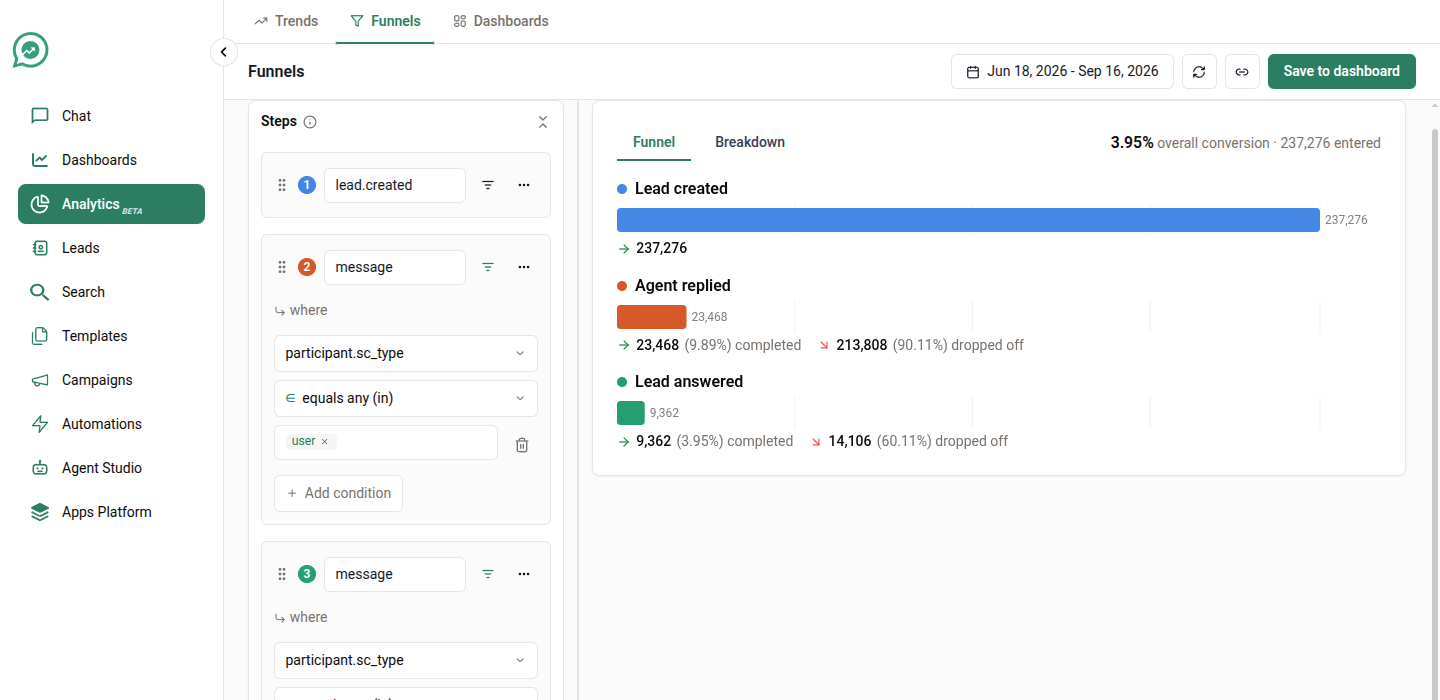
### Recipe 14: From new lead to a real conversation

**Build it**

1. Step 1 → **`lead.created`**.
2. Step 2 → **`message`**, filtered `participant.sc_type` **is** `user` — a human agent said something.
3. Step 3 → **`message`**, filtered `participant.sc_type` **is** `lead` — the lead answered.
4. Step 4 → **`lead.attribute.set`** — the lead was given a stage or disposition.
5. Settings → **Conversion window** `14 days`, **Step order** `Sequential`.

<figure><img src="https://3972437347-files.gitbook.io/~/files/v0/b/gitbook-x-prod.appspot.com/o/spaces%2FN79Qkvilzy4rLCQtSeUa%2Fuploads%2Fgit-blob-8d598a4a8253f0b0c1a811c2fb386b341eb12f63%2Fanalytics-funnels-builder.png?alt=media" alt=""><figcaption><p>The four-step onboarding funnel</p></figcaption></figure>

**Read it**

This is your onboarding funnel, end to end. The biggest drop usually sits between steps 1 and 2 — leads nobody ever got to.

**Sequential** is the setting you want almost always: step 3 must happen after step 2, but the lead is allowed to do other things in between.

***

### Recipe 15: Which campaign converts best?

Take any funnel above and add a breakdown.

**Build it**

1. Build the funnel from [recipe 13](#recipe-13-did-anyone-reply-to-our-campaign).
2. Breakdown → **`journey.sc_name`**.

**Read it**

One funnel per campaign, each with its own conversion rate, side by side.

Because a lead can pick up different campaign values at different steps, **Attribution** (in Settings) decides which one they're counted under. **First touchpoint** is the usual choice: the lead counts under whichever campaign reached them first.

***

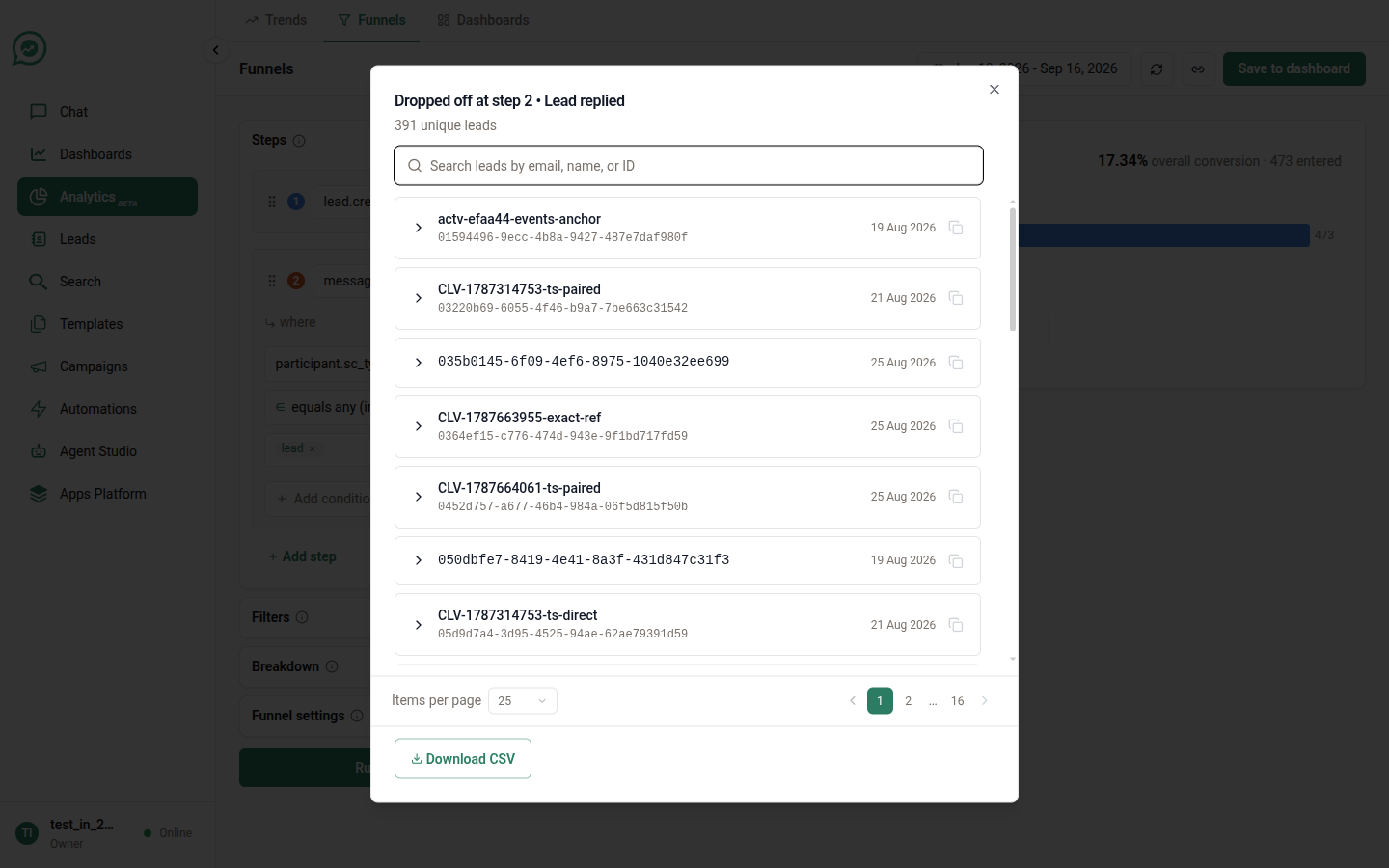
### Recipe 16: Who exactly dropped off, and can I have the list?

This is the feature that turns a funnel from a report into a work queue.

**Build it**

1. Build any funnel.
2. Click a step's bar, or the drop-off between two bars.

**Read it**

A panel opens with the actual leads — searchable, paged, showing the attributes carried on their events. [**Download CSV**](/application/analytics/dashboards.md#getting-the-numbers-out) gives you the whole population, not just the page you're looking at.

<figure><img src="https://3972437347-files.gitbook.io/~/files/v0/b/gitbook-x-prod.appspot.com/o/spaces%2FN79Qkvilzy4rLCQtSeUa%2Fuploads%2Fgit-blob-fbca92d10506e0db16040d47b6f437a31506f3e6%2Fanalytics-funnel-actors.png?alt=media" alt=""><figcaption><p>The leads behind a funnel step</p></figcaption></figure>

So *"everyone who was reached by the Diwali campaign and never replied"* is two clicks and a CSV away.

***

## Advanced recipes — Trends

Everything above uses one event and one breakdown. The four controls below are where Analytics stops being a chart tool and starts answering questions you'd otherwise export to a spreadsheet.

### Recipe 17: Count several different events as one thing

"Engagement" is rarely a single event. A lead who replies, books a demo, or updates their details has engaged three different ways — and you want one line, not three.

**Build it**

1. Series → pick your first event, e.g. **`message`**.
2. Open the series' **⋯ menu** → **Count multiple events as a single series**.
3. The card becomes **"Any of the events below"**. Use **+ Add event** to add the others, e.g. `lead.attribute.set` and your own `demo_booked`.
4. Measurement → **Unique leads**.

<figure><img src="https://3972437347-files.gitbook.io/~/files/v0/b/gitbook-x-prod.appspot.com/o/spaces%2FN79Qkvilzy4rLCQtSeUa%2Fuploads%2Fgit-blob-61f04fc338936e3d6fdaf758f922ecae1e9377fa%2Fanalytics-recipe-17-combined.png?alt=media" alt=""><figcaption><p>One series counting several events as “any of these”</p></figcaption></figure>

**Read it**

The events are OR'd: a lead is counted if they did *any* of them. With **Unique leads**, a lead who did all three still counts once — which is exactly what "how many people engaged at all" means.

Up to **10 events** can be combined into one series.

{% hint style="warning" %}
**This works fully in Trends, but only partly in Funnels.**

A combined *funnel step* does match "any of these events", but **the per-event filters on it are not applied yet**. The builder shows a note saying so on the card. If your combined step needs a filter to be correct, split it into separate funnels until that lands.
{% endhint %}

***

### Recipe 18: Split by two things at once

One breakdown tells you *which campaign*. Two tell you *which campaign, on which channel* — and that's usually where the real answer is hiding.

**Build it**

1. Series → **`message`**, **Total count**.
2. Breakdown → **`participant.sc_type`**, then **Add breakdown** → **`room.sc_channel`**.
3. Chart view → **Table**.

<figure><img src="https://3972437347-files.gitbook.io/~/files/v0/b/gitbook-x-prod.appspot.com/o/spaces%2FN79Qkvilzy4rLCQtSeUa%2Fuploads%2Fgit-blob-e810f3f97adf6ee9c8aec8dcf93308f1f1f1ee16%2Fanalytics-recipe-18-two-breakdowns.png?alt=media" alt=""><figcaption><p>Sender and channel together, read as a table</p></figcaption></figure>

**Read it**

You get one row per *combination* — `lead · whatsapp`, `app · whatsapp`, `lead · website`, and so on. That's what finds the case where automations perform fine on WhatsApp and badly everywhere else.

Trends allows up to **three** breakdown attributes. Be careful: three attributes with ten values each is a thousand possible lines. The 25-line cap plus **Other** stops the chart exploding, but it also means a small-but-interesting combination can vanish into **Other**. Two attributes is usually the honest limit for a chart; use **Table** if you need three.

***

### Recipe 19: A ratio you work out yourself

"Messages per lead" isn't an event — it's one number divided by another. Analytics has no formula field, so you build both halves and divide.

**Build it**

1. Series 1 → **`message`**, measurement **Total count**, labelled *Messages*.
2. Series 2 → **`message`**, measurement **Unique leads**, labelled *Leads talking*.
3. Same event, different measurement — that's the trick.
4. Chart view → **Table**, **Group by** → **Week**.

<figure><img src="https://3972437347-files.gitbook.io/~/files/v0/b/gitbook-x-prod.appspot.com/o/spaces%2FN79Qkvilzy4rLCQtSeUa%2Fuploads%2Fgit-blob-e9a8e0dfc54aaaca1e05323046e8cfd0a17414f8%2Fanalytics-recipe-19-ratio.png?alt=media" alt=""><figcaption><p>Both halves of the ratio, week by week</p></figcaption></figure>

**Read it**

Each row gives you both numbers for that week; messages ÷ leads is your conversation depth. A rising ratio means fewer people having longer conversations — which is a very different business from more people having short ones, and a single line would hide the difference.

Export with [**Export CSV**](/application/analytics/dashboards.md#getting-the-numbers-out) if you want the division done in a spreadsheet.

***

### Recipe 20: How bad does it get, not how bad is it on average

Averages are the wrong tool for anything you'd write an SLA against. One conversation somebody forgot to close drags the mean up; the median hides the tail entirely.

**Build it**

1. Series → **`lead.session.ended`**.
2. Measurement → **Sum / average of a number**, attribute **`session.sc_duration_secs`**.
3. Operation → **p90**.
4. Breakdown → **`session.sc_type`**.
5. Group by → **Week**.

<figure><img src="https://3972437347-files.gitbook.io/~/files/v0/b/gitbook-x-prod.appspot.com/o/spaces%2FN79Qkvilzy4rLCQtSeUa%2Fuploads%2Fgit-blob-ee5cc1dd431d9160ed78d4f490a87645226a96b7%2Fanalytics-recipe-20-p90.png?alt=media" alt=""><figcaption><p>p90 conversation length — the number to write an SLA against</p></figcaption></figure>

**Read it**

p90 is "9 in 10 conversations finished faster than this". It's the number to quote in a commitment, and the one that moves when things are quietly getting worse.

Run it three times — **avg**, **median**, **p90** — and the shape of the gap tells you whether you have a consistent process or a good average hiding a bad tail.

***

### Recipe 21: Which campaign first reached each lead, month by month

Every other campaign chart double-counts: a lead touched by three campaigns appears three times. This one counts each lead exactly once, under whichever campaign got there first.

**Build it**

1. Series → **`message`**.
2. On the series row, filter → `participant.sc_type` **is** `app` **and** `journey.sc_type` **is** `campaign`.
3. Measurement → **First occurrence matching filters**.
4. Breakdown → **`journey.sc_name`**.
5. Group by → **Month**.

**Read it**

Each lead contributes a single 1, in the month of their *earliest campaign message*, under that campaign's name. Sum the whole chart and you get your reachable audience — no double counting, whatever the overlap between campaigns.

{% hint style="warning" %}
**Read the two first-occurrence measurements carefully — they answer different questions.**

* **First-ever occurrence** looks at the lead's very first `message` of any kind. If that message wasn't a campaign one, the lead is excluded entirely — even though they were later reached by a campaign.
* **First occurrence matching filters** looks at the earliest message *that matches your filters*, which is what this recipe wants.

Both search **all of time** and then keep only leads whose qualifying event falls inside your dates. So a lead first reached in March won't appear in an April–June window at all — a later campaign touch will not stand in for it. That is deliberate: it's what makes the number a true cohort rather than a running total.
{% endhint %}

***

## Advanced recipes — Funnels

### Recipe 22: Remove the leads who disqualified themselves

A funnel that counts people who unsubscribed halfway through is measuring the wrong population.

**Build it**

1. Build the funnel from [recipe 14](#recipe-14-from-new-lead-to-a-real-conversation).
2. **Funnel settings** → **Exclusion steps** → **Add exclusion**.
3. Pick the disqualifying event — your own `unsubscribed`, or **`lead.status.updated`** with `lead.sc_new_status` **is** `inactive`.
4. Set **Between step** 1 and 3.

<figure><img src="https://3972437347-files.gitbook.io/~/files/v0/b/gitbook-x-prod.appspot.com/o/spaces%2FN79Qkvilzy4rLCQtSeUa%2Fuploads%2Fgit-blob-dd3f0eddb44c0b10182fbcf9504fd3ad5b1cd407%2Fanalytics-recipe-22-funnel-settings.png?alt=media" alt=""><figcaption><p>Funnel settings: window, step order, conversion mode and an exclusion step</p></figcaption></figure>

**Read it**

Any lead who did that event between those two steps is removed from the **whole** funnel — including step 1, not just the later steps. So your step-1 count drops, and every percentage is recalculated against the population that was genuinely still in play.

The two steps you name must be **different**, and in funnel order — step 3 to step 1 is rejected.

That's the point, and it's also the trap: if you compare a funnel with exclusions against one without, the denominators are different. Don't read the two conversion rates as comparable.

***

### Recipe 23: Does the order actually matter?

The same three steps answer three different questions depending on one setting.

**Build it**

Build any 3-step funnel, then run it three times, changing **Funnel settings → Step order**:

<table><thead><tr><th width="170">Setting</th><th width="300">What it counts</th><th>Use when</th></tr></thead><tbody><tr><td><strong>Sequential</strong></td><td>B must happen after A, but anything may happen in between</td><td>The default, and what "funnel" normally means</td></tr><tr><td><strong>Strict order</strong></td><td>B must come <em>directly</em> after A, with no other funnel step between</td><td>You're testing a prescribed path and a detour counts as failure</td></tr><tr><td><strong>Any order</strong></td><td>All steps inside the window, in any sequence</td><td>You care whether people did all three things, not the order</td></tr></tbody></table>

<figure><img src="https://3972437347-files.gitbook.io/~/files/v0/b/gitbook-x-prod.appspot.com/o/spaces%2FN79Qkvilzy4rLCQtSeUa%2Fuploads%2Fgit-blob-0445c45e6882cbfc6f18419343e7a5b815d44129%2Fanalytics-recipe-23-any-order.png?alt=media" alt=""><figcaption><p>The same three steps under Any order</p></figcaption></figure>

**Read it**

The gap between **Sequential** and **Strict order** is your "people who wandered" number — leads who did everything but revisited an earlier step on the way. If that gap is large, your process has a loop in it that your funnel diagram doesn't show.

**Any order** has no drop-off between two specific steps, so don't read its bars as a sequence.

***

### Recipe 24: Which step is actually the problem?

**Build it**

1. Take any funnel.
2. **Funnel settings** → **Conversion rate calculation** → **Relative to previous step**.

<figure><img src="https://3972437347-files.gitbook.io/~/files/v0/b/gitbook-x-prod.appspot.com/o/spaces%2FN79Qkvilzy4rLCQtSeUa%2Fuploads%2Fgit-blob-24ba334b12345f17d8dcc53753356e0f04b4aed6%2Fanalytics-recipe-24-relative.png?alt=media" alt=""><figcaption><p>Relative mode: each step as a share of the one before it</p></figcaption></figure>

**Read it**

**Overall** shows each step as a share of everyone who entered — good for reporting the headline. **Relative to previous step** shows each step as a share of the step before it — good for *finding the leak*.

A funnel that reads 100 → 80 → 40 → 38 looks like a steady decline in Overall. In Relative it reads 80%, 50%, 95% — and the problem is unmistakably step 3.

***

### Recipe 25: Who gets the credit?

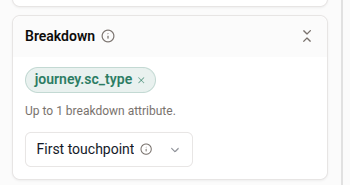
When you break a funnel down by campaign, a lead who touched two campaigns has to be counted under one of them. **Attribution** (in the Breakdown section) decides which, and the four options give genuinely different numbers.

<table><thead><tr><th width="180">Mode</th><th width="300">The lead counts under…</th><th>Good for</th></tr></thead><tbody><tr><td><strong>First touchpoint</strong></td><td>The earliest value seen on its step events</td><td>"What brought them in?" — acquisition credit</td></tr><tr><td><strong>Last touchpoint</strong></td><td>The latest value seen</td><td>"What closed them?" — conversion credit</td></tr><tr><td><strong>All steps</strong></td><td><em>Every</em> value it saw — so one lead appears in more than one funnel</td><td>Reach per campaign. Note the funnels will sum to more than your lead count.</td></tr><tr><td><strong>Specific step</strong></td><td>The value on the step you name</td><td>A specific question. A lead with no event at that step is dropped from the breakdown entirely.</td></tr></tbody></table>

<figure><img src="https://3972437347-files.gitbook.io/~/files/v0/b/gitbook-x-prod.appspot.com/o/spaces%2FN79Qkvilzy4rLCQtSeUa%2Fuploads%2Fgit-blob-9a7ac1f5a9b624da08e313e38d6d11cadc87bbbb%2Fanalytics-recipe-25-attribution.png?alt=media" alt=""><figcaption><p>The Breakdown section, where Attribution is chosen</p></figcaption></figure>

**Read it**

Run the same funnel under **First** and **Last touchpoint** and compare. Where the two disagree sharply, you have campaigns that are good at starting conversations and different ones that are good at finishing them — and paying both on the same metric is how budget gets misallocated.

***

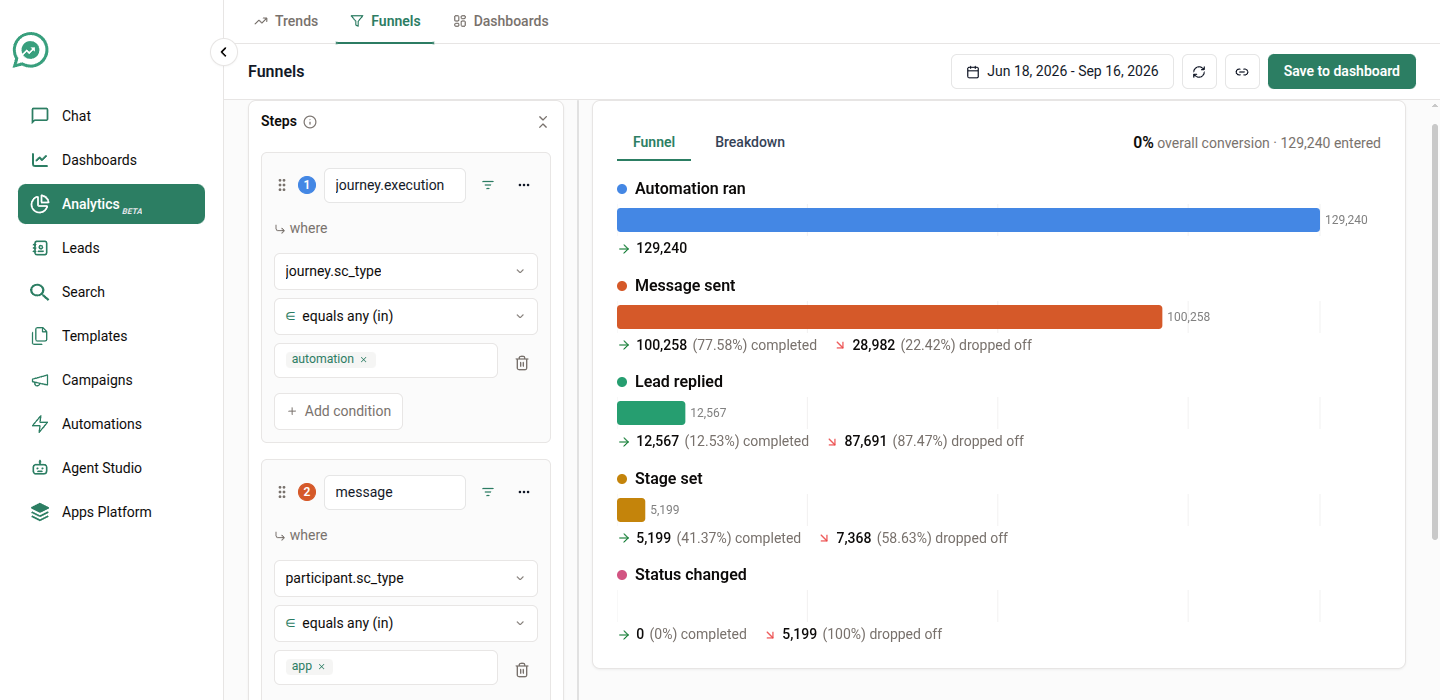
### Recipe 26: The full campaign-to-pipeline funnel

Everything above changes one setting at a time. This builds the whole thing: five steps, filters on individual steps, a breakdown, and a tight window — the shape of a funnel you'd actually put in front of a stakeholder.

**Build it**

1. Step 1 → **`journey.execution`**, filtered `journey.sc_type` **is** `campaign` — the campaign tried to reach the lead.
2. Step 2 → **`message.receipt.delivered`** — it arrived on their phone.
3. Step 3 → **`message.receipt.read`** — they opened it.
4. Step 4 → **`message`**, filtered `participant.sc_type` **is** `lead` — they answered.
5. Step 5 → **`lead.attribute.set`** — someone moved them in the pipeline.
6. **Funnel settings** → **Conversion window** `7 days`, **Step order** `Sequential`, **Conversion rate calculation** `Relative to previous step`.
7. Breakdown → **`journey.sc_name`**, **Attribution** → **First touchpoint**.

<figure><img src="https://3972437347-files.gitbook.io/~/files/v0/b/gitbook-x-prod.appspot.com/o/spaces%2FN79Qkvilzy4rLCQtSeUa%2Fuploads%2Fgit-blob-7ba7eb23b149e596d92d94c79722bc1e0b888403%2Fanalytics-recipe-26-five-step.png?alt=media" alt=""><figcaption><p>Five steps, each failing for a different reason</p></figcaption></figure>

**Read it**

Five steps is the maximum, and each one fails for a different reason — which is the point. Delivery failures are a data problem, read failures are a timing and subject-line problem, reply failures are a content problem, and step 5 failing while step 4 succeeds is a *staffing* problem: leads answered and nobody picked them up.

With **Relative to previous step**, you read straight down the column for the worst percentage and that's where to spend the week.

{% hint style="info" %}
**Why the breakdown still works, even though most steps know nothing about campaigns.**

Only step 1 carries the campaign name — a delivery receipt or a lead's reply has no campaign attached to it. **First touchpoint** takes the earliest campaign value seen on *any* of the lead's step events, so step 1 supplies it and the whole funnel is grouped correctly.

Switch that to **Specific step** and pick a later step, and the breakdown will empty out, because those events have no value to group by. That's the single most common way this funnel gets built wrong.
{% endhint %}

***

## Limits worth knowing

<table><thead><tr><th width="300">Limit</th><th>Value</th></tr></thead><tbody><tr><td>Events combined into one series</td><td>10</td></tr><tr><td>Breakdown attributes — Trends</td><td>3</td></tr><tr><td>Breakdown attributes — Funnels</td><td>1</td></tr><tr><td>Breakdown lines before "Other"</td><td>25</td></tr><tr><td>Funnel steps</td><td>2 to 5</td></tr><tr><td>Funnel conversion window</td><td>90 days</td></tr></tbody></table>

***

## Two habits worth building

**Name your series.** A chart legend that reads *Sent · Delivered · Read* is a chart you can send to someone else. One that reads `message.receipt.sent (total_count)` is a chart you'll have to explain.

**Sanity-check the total first.** Before trusting a breakdown, run the same query with no breakdown and check the total looks like the business you know. Nine times out of ten a surprising chart is a filter doing something you didn't intend.

***

Happy with a chart? [Save it to a dashboard](/application/analytics/dashboards.md).