> For the complete documentation index, see [llms.txt](https://docs.saleschat.pro/llms.txt). Markdown versions of documentation pages are available by appending `.md` to page URLs; this page is available as [Markdown](https://docs.saleschat.pro/principles/contacts-chatrooms-and-customer-lifecycles.md).
# Contacts, Chatrooms & Customer Lifecycles
This page describes Contact, Chatroom and their lifecycle as well as how to handle multiple Contacts with the same Phone Number
## Single Chatroom Per Contact (Whatsapp's Restrictions)
Whatsapp allows only one Chatroom between two Phone Numbers. If you have an existing Chatroom with a Customer on Whatsapp, you can either chat with the Customer in that Chatroom or you can delete the Chatroom and start a fresh conversation. There are no scenarios where you can have two simultaneous Chatrooms with the Customer in 1-1 Chats.
Having said that, since we use one Whatsapp Business Account for a team as large as your Organisation's we understand that you may end up having multiple Contacts / Leads in your CRM with the same Phone Number.
We handle such scenarios via Customer Lifecycle as written below.
## Multiple Contacts with the same Phone Number
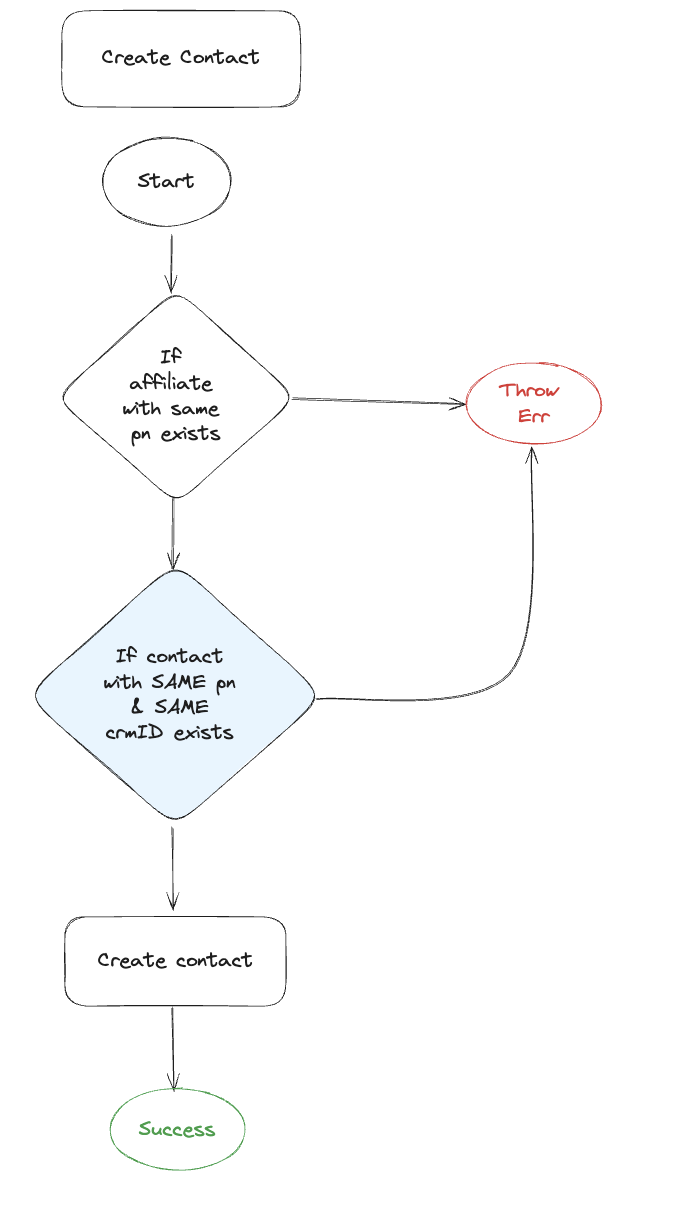
Saleschat lets you create multiple Contacts with the same Phone Number as long as
1. The Contacts have a distinct crm\_id
2. The Phone Number is not used for an Affiliate Chatroom
{% hint style="info" %}
Affiliate Chatrooms are like any other Chatrooms although mainly used for speaking with back office, partners etc. where multiple users are speaking with the affiliate simultaneously within the same Chatroom. Contact Saleschat's Team for more information on affiliate Chatrooms.
{% endhint %}
Create contact flowchart
## Chatroom per Contact
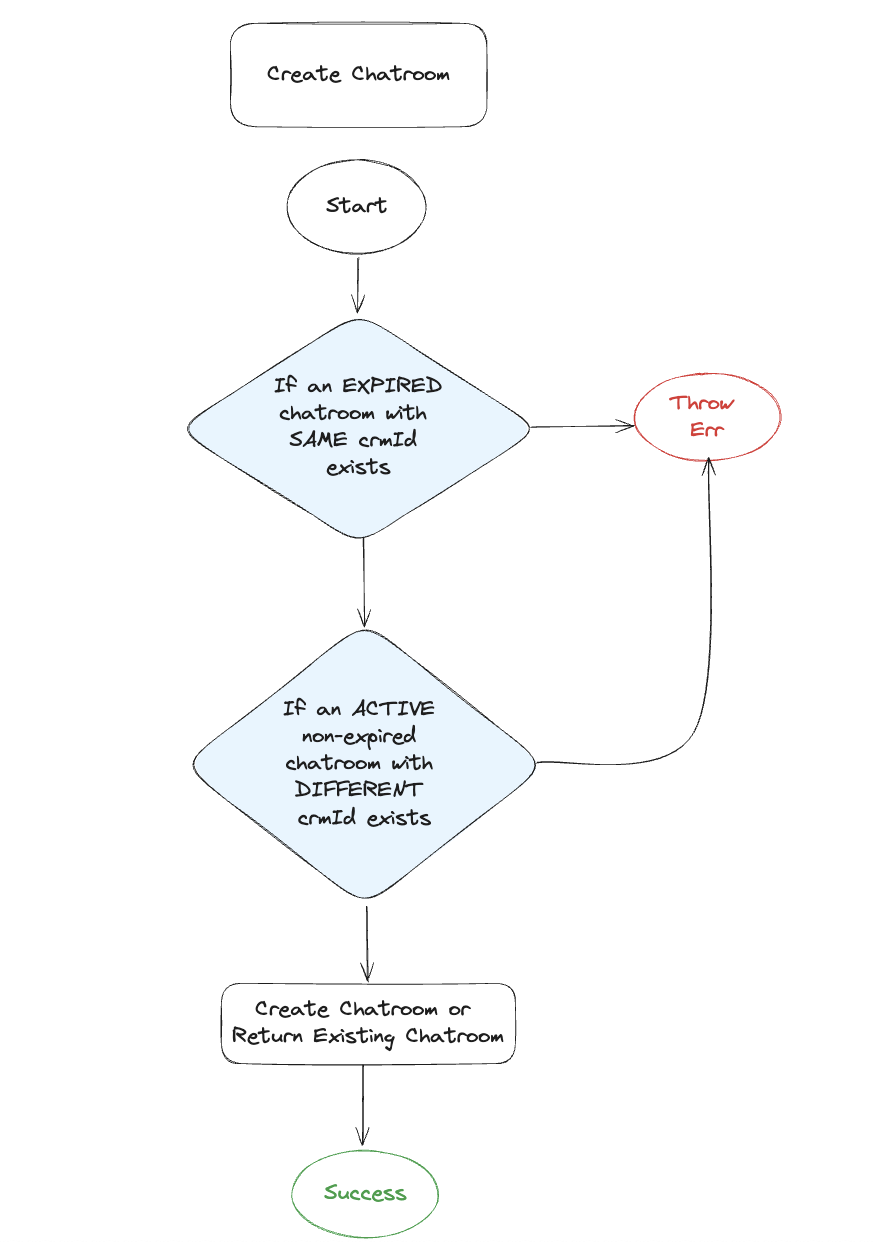
Saleschat lets you create one Chatroom per Contact as long as there is no other active Chatroom for the Contact's Phone Number using the same WABA Phone.
Create chatroom flowchart
## Activate / Deactivate a Chatroom
A Chatroom can be activated/deactivated. Activated/Deactivated can be considered as enabled/ disabled.
A deactivated chatroom can be re-activated as long as there is no other active chatroom for a different Contact with the same Phone Number using the same WABA Phone.
{% hint style="info" %}
At any given time only one Chatroom for a Phone Number within a WABA Phone can be active. If two Contacts have the same Phone Number, then a Chatroom for only one of those Contacts can be in active state.
{% endhint %}
> **How do I deactivate a Chatroom?**
>
> Organisations can configure 'n' number of days since the last message from the Contact in a Chatroom after which the Chatroom will be deactivated.
>
> Alternatively Organisations can deactivate the Chatroom using [Deactivate Chatroom API](/deprecated-apis/chatroom-deprecated.md#v1-org-orgid-contacts-chatroom-chatroomid-deactivate).
> **How do I activate a Chatroom?**
>
> Organisations can activate the Chatroom using [Activate Chatroom API.](/deprecated-apis/chatroom-deprecated.md#v1-org-orgid-contacts-chatroom-chatroomid-activate)
> **How do I communicate with a deactivated Chatroom?**
>
> Saleschat disallows any further messaging to a deactivated Chatroom. You first need to activate the Chatroom.
{% hint style="info" %}
Only messages **sent via Campaigns** **are allowed** in a deactivated Chatroom. Contact Saleschat Team to learn more about Campaigns.
{% endhint %}
> **What if I receive a message from a Phone Number for whom the Chatroom is deactivated?**
>
> If there is another active Chatroom for this phone number, then Saleschat will route the incoming message to that active Chatroom
>
> If there is no other active Chatroom for this phone number, then Saleschat will route the incoming message to the latest deactivated Chatroom and also activate that Chatroom.
## Expire a Contact & Chatroom
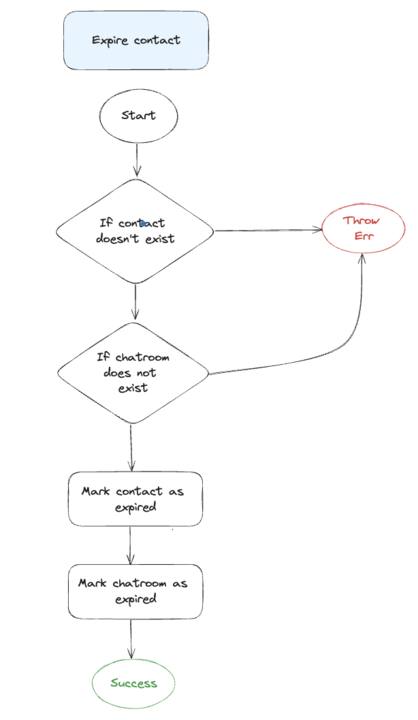
A Contact can be expired. Expired can be considered similar to soft delete, where the data of the contact as well as that of the Chatroom and the chats for this contact are not deleted. An expired Contact / Chatroom cannot be reverted.
> **How do I expire a Contact?**
>
> As of now, we allow organizations to set a configuration to expire the contact within 'n' number of days of creation.
> **How do I communicate with an expired Contact?**
>
> Saleschat disallows any further messaging to an expired Contact. You may create a new Contact with the same phone number and a different crm\_id and a new Chatroom for this new Contact to be able to communicate.
{% hint style="info" %}
Even messages sent via a Campaign are disallowed in an Expired Chatroom
{% endhint %}
> **What if an expired Contact messages us?**
>
> If there is no other non-expired Chatroom for this phone number, then Saleschat will route the incoming message to the latest expired Chatroom.
>
> Saleschat further allows you to configure an auto-trigger response for every message received in an expired Chatroom